WordPress Plugins: Liveblog

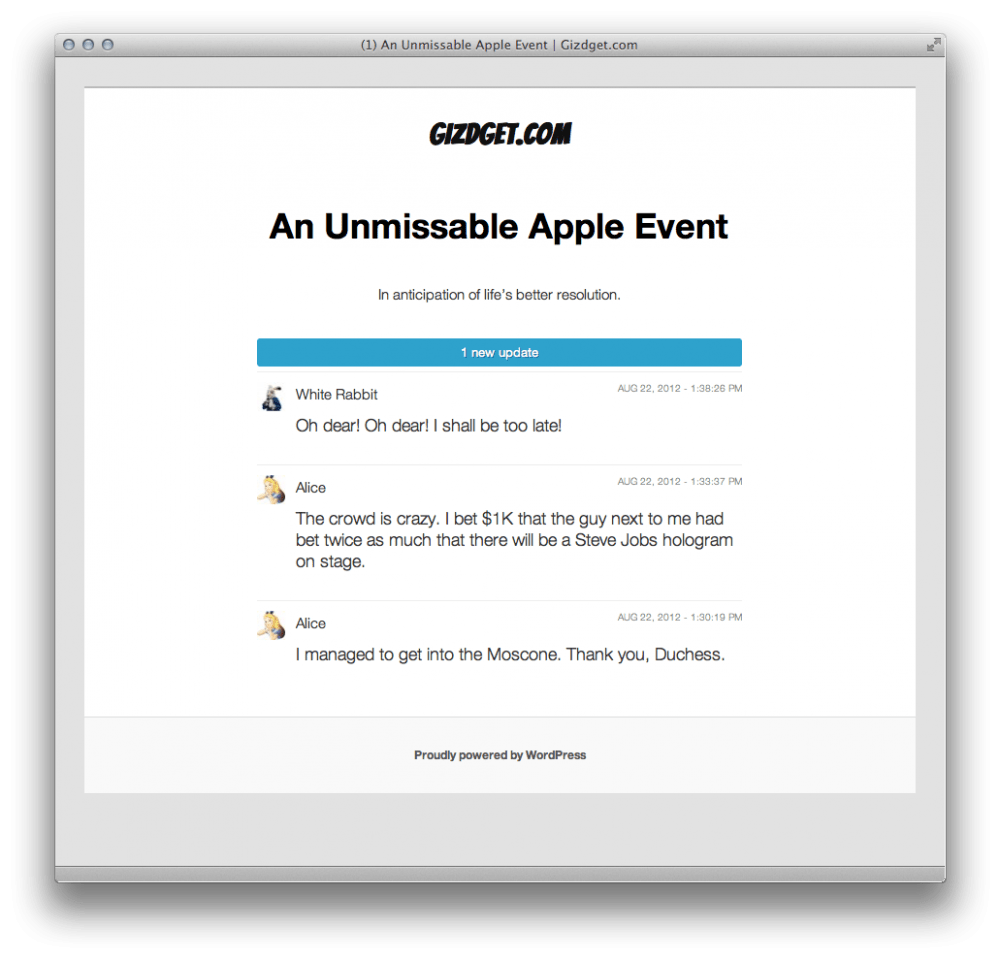
WordPress.com VIP blog announced the availability of the Liveblog WordPress plugin.  This is pretty cool for anyone doing live coverage of events and such.  One of the coolest things about this plugin is that you don’t have to setup a separate blog for live blogging.  You can turn any post – new or existing – into a live blog and post updates straight from the front page.  People who have the blog post open in their browser, will see a notification of an update available, like the one the screenshot below.

Pretty cool.

GoDaddy goes down, the cycle is complete

Back when I just started doing web things, there weren’t Web 2.0, cloud computing, or much of web services.  People used to do their own thing, and that’s exactly what I was doing too.  I had a home server that was my web, email, ftp, dns, file, and print server.  And maybe something else server as well. I just don’t remember anymore.  But gradually, companies started popping up left right and center, that made it easier to have your stuff somewhere else, somewhere other than your own server.  And one of the first things that I “gave away” were the domain names.  I tried a few companies back then and chose to go with GoDaddy, because it was by far the cheapest I could find.  Then my web server was moved to a VPS hosting, which was cheaper and faster than my home server machine.  Then email went to Gmail.  Then I got rid of printers at home.  Then I moved my pictures to Flickr.  And then the rest of the files ended up on either Dropbox or Evernote.  The home server was long gone.

In the last three or four years, I’ve been feeling the need to reverse that migration.  First, when my web hosting company got hacked and lost all the data (yeah, apparently they weren’t keeping backups either).   Then with some migrations issues I had over Gmail, which just didn’t have all the tools I needed.  And now with GoDaddy going offline for a few hours yesterday, because of a DDOS attack against their servers.

When considering such a move, one of the first thoughts is usually – do I really think that my own servers cannot be hacked or DDOSed?  Of course not.  They can, and probably will.  But there are two small things to remember here.  Firstly, I am a much smaller target than GoDaddy. And secondly, having control in your own hands is important.  Need backups?  Do them yourself.  Being hacked and need to move to another host urgently – you have everything you need to do so.  Something went down, it’s up to you to fix it.

I’m not saying that I am moving everything back onto my home server yet.  But I am seriously considering getting some of that control back, and hosting it on my own server.  After the GoDaddy incident yesterday, I am most definitely setting up my own “DNS friends circle”.  And with disk space getting so much cheaper, I am seriously considering moving the emails and files back to my own server again.  Especially after I discovered that Flickr lost or corrupted some of the files that I’m storing over there.

This whole thing of moving back and forward is nothing new though.  Progress often happens in spirals.  Think, for example, about the desktops.  Things started off as dumb terminals connected to a central mainframe computer.  Then then moved into standalone desktop computers.  Then terminal servers got popular again, with slightly less dumber terminal clients.  Then desktops and laptop again.  And now once again things move to the cloud, somewhere far away from the end user.  Who, in tern, moves to a smartphone or table, which is, arguably,  the next reincarnation of the desktop computer.

Things go back and forward all the time.  So I’m thinking it’s time for me to get some of my things back.  Even if just for a while.
Managing gettext translations on the command line

I am working on a rather multilingual project in the office currently.  And, as always, we tried a few alternatives before ending up with gettext again.  For those of you who don’t know, gettext is the de facto standard for managing language translations in software, especially when it comes to messages and user interface elements.  It’s a nice, powerful system but it’s a bit awkward when things come to web development.

Anyways, we started using it in a bit of a rush, without doing all the necessary planning, and quite soon ended up in a bit of a mess.  Different people used different editors to update translations.  And each person’s environment was setup in a different way.   All that made its way into the PO files that hold translations.  More so, we didn’t really define the procedure for the updates of translations.  That became a bigger problem when we realized that Arabic has only 50 translated strings, while English has 220, and Chinese 350.  All languages were supposed to have exactly the same amount of strings, even if the actual translations were missing.

So today I had to rethink and redefine how we do it.  First of all, I had to figure out and try the process outside of the project.  It took me a good couple of hours to brush up my gettext knowledge and find some useful documentation online.  Here is a very helpful article that got me started.

After reading the article, a few manuals and playing with the actual commands, I decided on the following:

  1. The source of all translations will be a single POT file.  This file will be completely dropped and regenerated every time any strings are updated in the source code.
  2. Each language will have a PO file of its own. However, the strings for the language won’t be extracted from the source code, but from the common POT file.
  3. All editors will use current project folder as the primary path.  In other words, “.” instead of full path to “/var/www/foobar”.  This will make all file references in PO/POT files point to a relative location to the project folder, ignoring the specifics of each contributor’s setup.
  4. Updating language template files (PO) and building of MO files will be a part of the project build/deploy script, to make sure everything stays as up to date as possible.

Now for the actual code.   Here is the shell script that does the job. (Here is a link to the Gist, just in case I’ll update it in the future.)

#!/bin/bash

DOMAIN="project_tag"
POT="$DOMAIN.pot"
LANGS="en_US ru_RU"
SOURCES="*.php"

# Create template
echo "Creating POT"
rm -f $POT
xgettext \
 --copyright-holder="2012 My Company Ltd" \
 --package-name="Project Name" \
 --package-version="1.0" \
 --msgid-bugs-address="[email protected]" \
 --language=PHP \
 --sort-output \
 --keyword=__ \
 --keyword=_e \
 --from-code=UTF-8 \
 --output=$POT \
 --default-domain=$DOMAIN \
 $SOURCES

# Create languages
for LANG in $LANGS
do
 if [ ! -e "$LANG.po" ]
 then
 echo "Creating language file for $LANG"
 msginit --no-translator --locale=$LANG.UTF-8 --output-file=$LANG.po --input=$POT
 fi

echo "Updating language file for $LANG from $POT"
 msgmerge --sort-output --update --backup=off $LANG.po $POT

echo "Converting $LANG.po to $LANG.mo"
 msgfmt --check --verbose --output-file=$LANG.mo $LANG.po
done


Now, all you need to do is run the script once to get the default POT file and a PO file for every language.  You can edit PO files with translations for as much as you want.  Then simply run the script again and it will update generated MO files.  No parameters, no manuals, no nothing.  If you need to add another language, just put the appropriate locale in the $LANGS variable and run the script again.  You are good to go.

Enjoy!

WordPress Plugins : Teleport

WordPress Plugins : Teleport

Teleport is all about getting around WordPress quickly! Use keyboard shortcuts to get where you need to go with just two key strokes.

First press “w”, then choose from the following:

  • e – (Edit) Edit current post/page
  • d – (Dashboard) Redirects to the Dashboard
  • s – (Settings) Redirects to the Settings page
  • a – (Archive) Redirects to Posts/Pages/Custom Post Types
  • q – (Quit) Logs the current user out / Redirects to Log In page
  • w – Close Teleporter / Log in
  • esc – Closes the Teleporter