Upgrading Amazon EC2 instance type

By now everybody knows that one of the major benefits to using cloud services rather than hosting on your own hardware is the ease to scale quickly.  Many web applications and large companies benefit from this, but what about smaller customers?  How about a single server?

Well, today one of our web servers was experiencing some pick loads.  It hosts a whole array of small websites built with WordPress, CakePHP, and other popular tools.  There was no time to update all these projects to work with multiple web servers.  And even redeploying them to multiple individual servers would have taken a few hours.  Instead, we’ve decided to upgrade the server hardware.

Pause for a second and imagine the situation with your own server.  Or a dedicated hosting account for that matter.  So much to configure.  So much to backup and restore.  So much to test.

Here’s how to do it, if your projects are on the Amazon EC2 instance (our was also inside a virtual private cloud (VPC), but even if it wasn’t, the difference would be insignificant):

  1. Login to the Amazon AWS console.
  2. Navigate to the Amazon EC2 section.
  3. Click on Instances in the left sidebar.
  4. Click on the instance that you want to upgrade in the list of your instances.
  5. Click Actions -> Instance State -> Stop.
  6. Wait a few seconds for the instance to stop.  You can use the Refresh button to update the list.
  7. (While your instance is still selected in the list of instances:) Click Actions -> Instance Settings -> Change Instance Type.
  8. In the popup window that appeared, select an Instance Type that you want.
  9. Click Apply.
  10. Click Actions -> Instance State -> Start.
  11. Wait a few seconds for the instance to start.
  12. Enjoy!

The whole process literally takes under two minutes.  You get exactly the same configuration – hostname, IP addresses (both internal and external), mounted EBS volumes, all your OS configuration, etc.  It’s practically a reboot of your machine. But into a different hardware configuration (CPU/RAM).

Coincidentally, earlier this morning I had to pack up a rack-mountable server – screws, cables, dusty boxes, the whole shebang.  It’s been a while since I’ve done that last time.

But I can tell you that I much prefer clicking a few buttons and moving on with my day.  Maybe I’m just not the hardware type.
 

WTF with Amazon and TCP

Here goes the story of me learning a few new swear words and pulling out nearly all my hair.  Grab a cup of coffee, this will take make a while to tell…

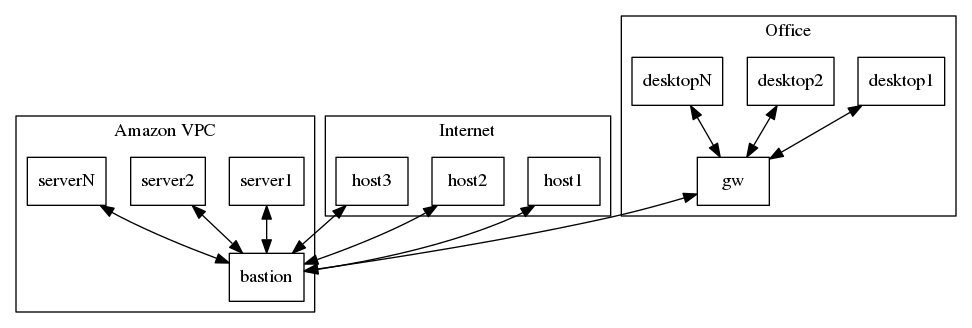
First of all, here is a diagram to make things a little bit more visual.

wtf

As you can see, we have an office network with NAT on the gateway.  We have an Amazon VPC with NAT on the bastion host.  And then there’s the rest of the Internet.

The setup is pretty straight forward.  There are no outgoing firewalls anywhere, no VLANs, no network equipment – all of the involved machines are a variety of Linux boxes.  The whole thing has been working fine for a while now.

A couple of weeks ago we had an issue with our ISP in the office.  The Internet connection was alive, but we were getting extremely high packet loss – around 80%.  The technician passed by, changed the cables, rebooted the ADSL modem, and we’ve also rebooted the gateway.  The problem was fixed, except for one annoying bit.  We could access all of the Internet just fine, except our Amazon VPC bastion host.  Here’s where it gets interesting.

Continue reading WTF with Amazon and TCP

Tao of Backup

tao

Tao of Backup is yet another way to tell people to backup their files.  Not only it explains why it is important, but also how to do it properly.  My favorite chapter is on testing:

The novice asked the backup master: “Master, now that my backups have good coverage, are taken frequently, are archived, and are distributed to the four corners of the earth, I have supreme confidence in them. Have I achieved enlightenment? Surely now I comprehend the Tao Of Backup?” The master paused for one minute, then suddenly produced an axe and smashed the novice’s disk drive to pieces. Calmly he said: “To believe in one’s backups is one thing. To have to use them is another.”

The novice looked very worried.

Funny, but so true.

Computer Science from the Bottom Up

Computer Science from the Bottom Up — A free, online book designed to teach computer science from the bottom end up. Topics covered include binary and binary logic, operating systems internals, toolchain fundamentals and system library fundamentals.

IPv6 20th birthday with 10% global penetration

Here’s some not so light coffee time reading on IPv6 – IPv6 non-alternatives: DJB’s article, 13 years later – an article that links, among other things to this Ars Technica article, which features some IPv6 statistics.  Summary?  Sure.  IPv6 RFC celebrates 20 year birthday this month with 10% global penetration.

ipv6

Exponential growth year-on-year is good.  But the absolute numbers aren’t so bright yet.  Especially considering some of the areas where it wasn’t so successful.