Code is poetry. But not literature.

WordPress has been known, among other things, for coining the phrase “code is poetry”.  It’s used in the footer of their website as well as quite a bit around the web.  This goes along with Donald Knuth paradigm of Literate Programming.

Turns out, some people disagree.  Most recently, Peter Seibel, the author of “Coders at Work” book of interviews, wrote this blog post titled “Code is not literature”.

It was sometime after that presentation that I finally realized the obvious: code is not literature. We don’t read code, we decodeit. We examine it. A piece of code is not literature; it is a specimen.

It’s an interesting read, filled with quotes and references to some of the smartest people in IT and Computer Science.

Upgrading Amazon EC2 instance type

By now everybody knows that one of the major benefits to using cloud services rather than hosting on your own hardware is the ease to scale quickly.  Many web applications and large companies benefit from this, but what about smaller customers?  How about a single server?

Well, today one of our web servers was experiencing some pick loads.  It hosts a whole array of small websites built with WordPress, CakePHP, and other popular tools.  There was no time to update all these projects to work with multiple web servers.  And even redeploying them to multiple individual servers would have taken a few hours.  Instead, we’ve decided to upgrade the server hardware.

Pause for a second and imagine the situation with your own server.  Or a dedicated hosting account for that matter.  So much to configure.  So much to backup and restore.  So much to test.

Here’s how to do it, if your projects are on the Amazon EC2 instance (our was also inside a virtual private cloud (VPC), but even if it wasn’t, the difference would be insignificant):

  1. Login to the Amazon AWS console.
  2. Navigate to the Amazon EC2 section.
  3. Click on Instances in the left sidebar.
  4. Click on the instance that you want to upgrade in the list of your instances.
  5. Click Actions -> Instance State -> Stop.
  6. Wait a few seconds for the instance to stop.  You can use the Refresh button to update the list.
  7. (While your instance is still selected in the list of instances:) Click Actions -> Instance Settings -> Change Instance Type.
  8. In the popup window that appeared, select an Instance Type that you want.
  9. Click Apply.
  10. Click Actions -> Instance State -> Start.
  11. Wait a few seconds for the instance to start.
  12. Enjoy!

The whole process literally takes under two minutes.  You get exactly the same configuration – hostname, IP addresses (both internal and external), mounted EBS volumes, all your OS configuration, etc.  It’s practically a reboot of your machine. But into a different hardware configuration (CPU/RAM).

Coincidentally, earlier this morning I had to pack up a rack-mountable server – screws, cables, dusty boxes, the whole shebang.  It’s been a while since I’ve done that last time.

But I can tell you that I much prefer clicking a few buttons and moving on with my day.  Maybe I’m just not the hardware type.
 

GitHub : Issue and Pull Request templates

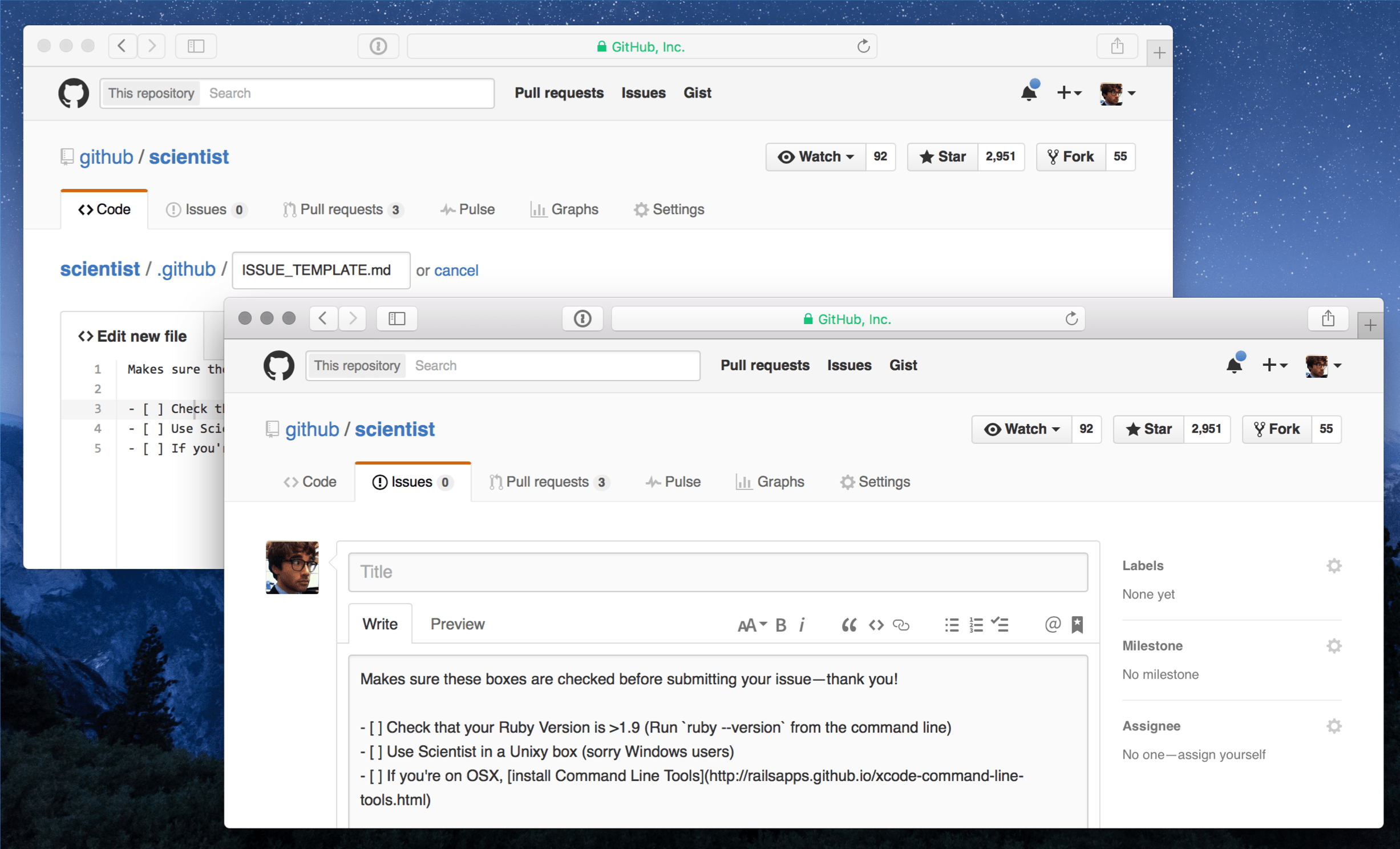
GitHub is working hard on extending the functionality of their web service.  They’ve released a much needed feature recently – templates for new issues and pull requests.

templates

I like the elegant implementation – they basically just grab the ISSUE_TEMPLATE.md and PULL_REQUEST_TEMPLATE.md files from the root of your project and stick them into the editor.  And if you are concerned about all the noise in your project’s root folder, they now also support .github/ folder.

One other feature released recently that you might have missed is direct upload of files into the repository – no need for fancy git clients and such.  This makes things so much simpler for the less technical folk, like designers and project managers.

Very nice!

WTF with Amazon and TCP

Here goes the story of me learning a few new swear words and pulling out nearly all my hair.  Grab a cup of coffee, this will take make a while to tell…

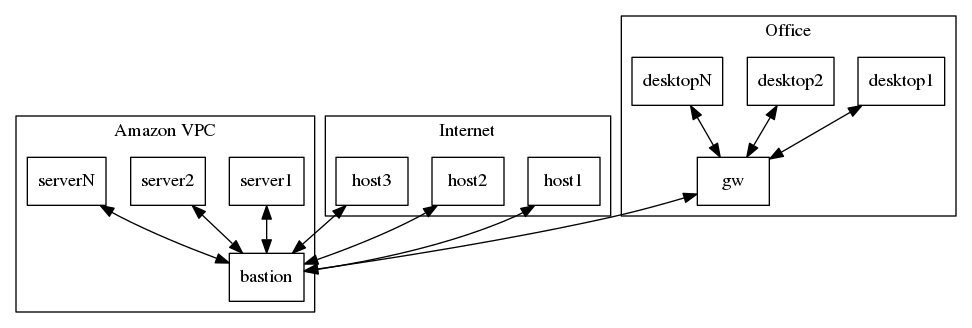
First of all, here is a diagram to make things a little bit more visual.

wtf

As you can see, we have an office network with NAT on the gateway.  We have an Amazon VPC with NAT on the bastion host.  And then there’s the rest of the Internet.

The setup is pretty straight forward.  There are no outgoing firewalls anywhere, no VLANs, no network equipment – all of the involved machines are a variety of Linux boxes.  The whole thing has been working fine for a while now.

A couple of weeks ago we had an issue with our ISP in the office.  The Internet connection was alive, but we were getting extremely high packet loss – around 80%.  The technician passed by, changed the cables, rebooted the ADSL modem, and we’ve also rebooted the gateway.  The problem was fixed, except for one annoying bit.  We could access all of the Internet just fine, except our Amazon VPC bastion host.  Here’s where it gets interesting.

Continue reading WTF with Amazon and TCP

CakeFest 2016

I’ve just purchased my ticket for CakeFest 2016! Feeling super excited … Whoop whoop! :)

I’ve attend quite a few events in the last 15-20 years, ranging from generic TEDx, through startup and entrepreneur, generic technology, web development, PHP, and software specific ones.  CakeFest 2014 back in Madrid, Spain was one of the most memorable and is definitely in top 3 of my all time favorites.  So I’m excited about the opportunity to do it all over again, this time in Amsterdam, Netherlands.

If you are involved at all with CakePHP framework, I strongly recommend you get your ticket, while it’s still at the “blind bird” price of $150 USD for the two day conference event.  If you are very new to CakePHP, you might want to consider the workshops as well, but make sure you do the main conference no matter what.