SPF – a JavaScript framework for navigation and page updates. Developed at YouTube.
Tag: optimization
Squirt – speed read the web, one word at a time
Squirt – speed read the web, one word at a time
Reducing the size of PNG images
I had an interesting problem today. I was uploading a third-party theme to a WordPress hosted on the server that I don’t control and really don’t have much access to. The server had a limitation of the upload size set to 10 MB. Yeah, I know. But not much I could do about that. The theme that I was uploading was packed into an 11 MB ZIP file. The theme itself was rather complicated (one of those commercially developed themes that are based on a framework and bring in a few plugins required for their functionality), so I couldn’t really remove anything from it.
Upon a quick inspection, I realized that more than half of the ZIP weight is due to a multitude of PNG images. And while some image were small and legitimate – like, say, icons – quite a few others were packing lots of bytes for nothing – demos, sample images, and such. Obviously, I wanted to reduce the size of these files significantly.
My usual tool of choice for such tasks is usually ImageMagick. To tell you the truth, I rarely work with PNG images. JPEGs are a more frequent target for me. So, I didn’t realize that ImageMagick handles -quality parameter differently for different image formats as fast as I’d like. But even when I did, the results weren’t all that great. In fact, the file sizes slightly grew in my tests.
Looking for a different approach, I came across this article about a tool called optipng, which can be conveniently installed in Fedora via yum. Unleashing this tool onto my PNG image collection showed me that whoever made the WordPress theme new what they were doing. opmipng reported that all images are already optimized and there isn’t much to do.
That’s when I found yet another tool to play with. This discussion at StackOverflow SuperUser suggests pngquant, which is also a breeze to install on Fedora with yum. So finally, I did something like this:
$ sudo yum install -y pngquant
$ cd folder/with/images
$ pngquant --force --ext .png --quality=0-75 *.png
That gave me exactly what I needed – a sufficient enough reduction in file sizes for the ZIP archive to fit into the upload limit set on the server.
Computers are *fast*!
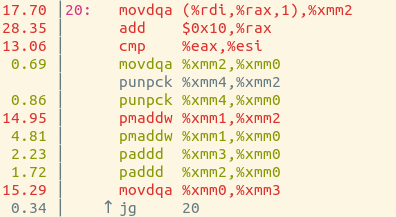
So instead I used perf, which is a totally magical performance measurement tool for Linux. I needed to upgrade my kernel first, which was a bit nervewracking. But I did it! And it was beautiful. There are colours, and we got it to annotate the assembly code with performance statistics. Here’s what I ran to do it:
$ perf record ./bytesum_intrinsics The\ Newsroom\ S01E04.mp4
$ perf annotate --no-source
And here’s the result:
The movdqa instructions have to do with accessing memory, and it spends 32% of its time on those instructions. So I think that means that it spends 32% of its time accessing RAM, and the other 68% of its time doing calculations. Super neat!
Visual Website Optimizer
- Well established, with many clients
- Not too expensive
- Integrates well with third-party tools, specifically WordPress and Google Analytics
- Has both a user friendly WYSIWYG editor and jQuery-based API
- Supports multipage tests via both unique URLs and URL patterns.