Moving from Delicious to Evernote

First things first:

  1. I absolutely love Delicious.  I’ve been using it for ages and it saved my life several times.  I’d easily pay for it if there was an option.
  2. My move to Evernote has nothing to do with recent rumors that Yahoo will shutdown Delicious.  I know that that is not true – they will probably just sell it or find some other way to chop it off, but they won’t shut it down completely.  And even if they would, someone will always start a clone.  And there are no worries about data export what so ever – Delicioius was always excellent with that.

Now that we got those things out of the way, I can relax and tell you what’s going on.  Yes, I am moving all my bookmarks from Delicious to Evernote.  I already moved the large chunk and I’ll sort out the rest in coming days.  So, why do I move?  For a number of reasons.

First of all, there was just too much hype to ignore.  I kept hearing about Evernote from all sides.  That alone, of course, wouldn’t push me to move, but it made me look closer.  I looked and I liked.  Here are the things that I liked:

  • Notes.  I love how Delicious handles bookmarks.  But bookmarks aren’t the only type of notes that I have.  Sometimes I just need to jot something down.  Sometimes I have a picture. Sometimes a file of different type.  If it wasn’t on the web, I couldn’t save it at Delicious.  I had a local application (gnote) running on my laptop for such things.  But my laptop is not always around.   I needed a web notes application forever.
  • Web clipper.   Collecting bookmarks for several years, I only now realized the risk of losing all that data.  Bookmark stores the URL only.  Maybe the title of the page.  And a brief description at best.  But if the bookmarked page will disappear, bookmark becomes useless.  With web clipper though it’s a different story.  You select full page or a part of it in your browser, press a button, and it’s clipped to your notes.  So even if the source page will disappear, you still have a copy.
  • Tags and folders.  Delicious was the first (or one of the first) applications to bring tags mainstream.  And tags are great.  But they aren’t perfect.  So are folders.  But a combination of both can take a long way.  Evernote organizes things into notebooks (folders) and tags.  That’s way more convenient and flexible.
  • Document indexing and image recognition! Not only this has tremendous practical value, but it brushes on my geek nerve.  It’s just elegant use of technology. If you upload a PDF or some other document to Evernote, it will index the text in that document automatically.  And you’ll be able to find the document by the text it has inside.  But what is even better – it’ll do the same for images.  Just imaging drinking out somewhere.  You order a bottle of something absolutely breathtaking.  But you’ll never remember how it’s called tomorrow. So you just snap a picture with your mobile and attach that picture to the note.  Evernote will analyze the picture, find any text on it, and will make this picture searchable by that text.  Brilliant!  We need more applications like that.

Those things got me thinking.  So I did a little test run.  I used Evernote for a couple of days, to see how it will hold up.  And the more I used it, the more I loved it!  I started migrating my bookmarks from Delicious not because I wanted to leave Delicious, but because I wanted to have this data in Evernote.

By the way, a few words about the move.  There is no direct import from Delicious.  There are some scripts and converters which would tell you how to export data from Delicious, convert it, and then import it into Evernote.  And I tried some.   But my problem wasn’t with the data conversion.  My problem was with the data itself.  As I said, some bookmarks were pointing to non-existing websites.  Some moved to different locations and had to be updated.  Some simply became obsolete – like bits and pieces of technology news which I thought were interesting at the time.  So after trying to fix data automatically (and I did some), I said that this collection is too valuable for me.  And I went manually.  One by one – checking the bookmark, clipping whenever possible, filing and tagging the note in Evernote.  Care to guess how much of the material was outdated? Around 35-40%!  With any kind of automated migration, I’d be inserting a lot of junk into the system that I was only starting to use.  I didn’t want that. So manual it was.

Somewhere in the middle of the migration, I got myself an Android phone.  Immediately a mobile app was installed which, given Internet access, brought all my notes so much closer to me.  The only thing that I wanted to have now was some way to synchronize selected notes to my phone, so that I’d have them even if there is no Internet connectivity.  Turns out that Evernote can do that too.  But for premium users.  For around $35/year you get the VIP goodies.  Offline synchronization is supported on the folder-level.  Just pick some folders and say that you want them on the mobile no matter what.  And you’ll have them.

I wanted to write this post for a few days now, but my migration isn’t completely over and I was stalling.  So what did finally push me to write this before I even finished migrating?  The new version of the Google Chrome extension.  One of the new features is as elegant as Evernote’s image recognition.  From now on, Evernote has an option to suggest notes next to your search engine results.  That just solves another big problem of mine.

You see, the thing is that even if I have something useful bookmarked, I often forget I do.  I run straight to Google and try to find it again.  Works most of the times, but not always.  Now, whenever I search Google for something, Evernote searches my notes in the background and lets me know if I have any notes matching.

By now you must be thinking that there must be something wrong.  Evernote sounds perfect, but we all know that that is impossible.  So, OK, I’ll tell you a few things that I don’t like.

  • Import from Delicious.  Even though I’d still chose to import manually, for many of my friends that won’t be the case.  There should be a simpler procedure to import data.
  • User interface.  It works, but it needs polish.  Again, I myself don’t mind too much.  But it’s a bit awkward to show Evernote to certain people.
  • Social.  One of the greatest benefits of Delicious is that it’s a social platform.  You can link with your friends, follow their bookmarks or tags, share bookmarks, and even send interesting bookmarks to your friends using Delicious.  In Evernote you can share a folder (with RSS feed).  And that’s about it.  There is no easy way to follow shared notes from my friends.  There doesn’t even seem to be a concept of friend yet.

These are the biggest concerns for me.  But they aren’t big enough.  As I said – the service is awesome.  The technology is fantastic.  And it doesn’t even matter if you are running on free or premium account.  Have a look at it, try it out, and let me know what you think.

P.S.: I have several public notebooks, but since I’m still organizing everything and moving things around, I won’t link to them at this time.  I’ll write another post with all the yummy links when the dust settles down a bit.

Volkswagen Tiguan 2011 for sale

A good friend of mine is leaving Cyprus, and selling his brand new Volkswagen Tiguan.  He made a webpage with some details and more pictures.  If you are interested or know any who might be, please spread the word.  The contact details are on the page as well.

Motorola Defy – my first Android device

It has been more than three years since Google announced their Android platform, but I still remember how excited I was.  I knew that it would be years before I’d own a device running Android, but that didn’t matter to me.  It was (and still is) a very cool concept and initiative.  Not everything worked out the way it was supposed to workout, and the process is still in its infancy, but I am super glad that I can finally participate rather than just read about it.  A couple of days ago I spent 355 EUR to buy my first Android device – Motorola Defy smartphone (specs on one page).

Choosing which smartphone to buy was easier for me than it was for my friends.  While most of them had to count on website reviews and comparison charts, I could actually spend a few minutes playing with different devices, since I was among the last people to get one.  But the decisive factor was this video review (in German, but quite easy to understand even if you are like me and don’t speak the language).  See, for me, one of the biggest problems with smartphones is that they are quite expensive, but at the same time, they are too fragile.  No matter how carefully I handle them, it takes only a year and some to render them unusable – touch screens get stack, buttons fall out, etc.  Motorola Defy seemed indestructible by comparison.  Plus it was moderately priced and of a smaller size than most other similar phones.

So far I’ve been using this smartphone for two days and I am very happy with it.  I am already used to the interface (which differs quite a bit from Symbian that I used on my previous phones).  I am comfortable with configuration options.  And I already went through hundreds and hundreds of applications.  The variety is just amazing.  Anything you could wish for is there – wallpapers, ringtones, games, calculators and converters, news and social updates, and much much more.  And I haven’t even started yet with commercial applications.

Of course, as with any other device, there are issues and nuances.   For example, there seems to be an issue with Android devices not being able to connect to ad-hoc wireless networks.  (I guess not many people use them, but I happen to be one of those who needs this often – some of the offices that I work at don’t have wireless networks, so I connect my laptop via Ethernet cable and then create an ad-hoc wireless network to share the connection with my phone.  I’m sure that it will be fixed in the future updates.)  But what I get now is different from what I had before.  Before I had to Google for the answers myself, read pages and pages of forums, and fight the problems on my own.  Now, all my friends are using Android devices.  And even though the devices vary, they have enough in common for us to share solutions to problems, cool applications, tips and tricks.  And I absolutely love this bit.

This phone is very much like a modern computer – it’s not very useful when offline.  With built-in synchronization of contacts with Gmail and Facebook, calendar synchronization, and support for Twitter, YouTube, and pretty much every other major social network, this phone shines when it’s online.

An extra layer of awesomeness is guaranteed by built-in GPS.  And unlike the previous generation of devices with built-in GPS, this time it actually makes sense.  No longer I need to wait for 5 minutes until all satellites are acquired and my position is triangulated.  It just works and takes mere seconds.  My position information can then be utilized by a whole range of applications – camera geo-tagging pictures that I take, Twitter telling where I am, and foursquare which is a lot of fun in itself.

Even though I had this phone for only two days, I’ve kept in touch with Android platform for years.  So now I can talk about this for days.  It turns out I am as excited about Android as I was three years, and getting myself one was exactly what I needed to do.  My only regret is that I haven’t done it earlier.

Suckling pig – a dream come true

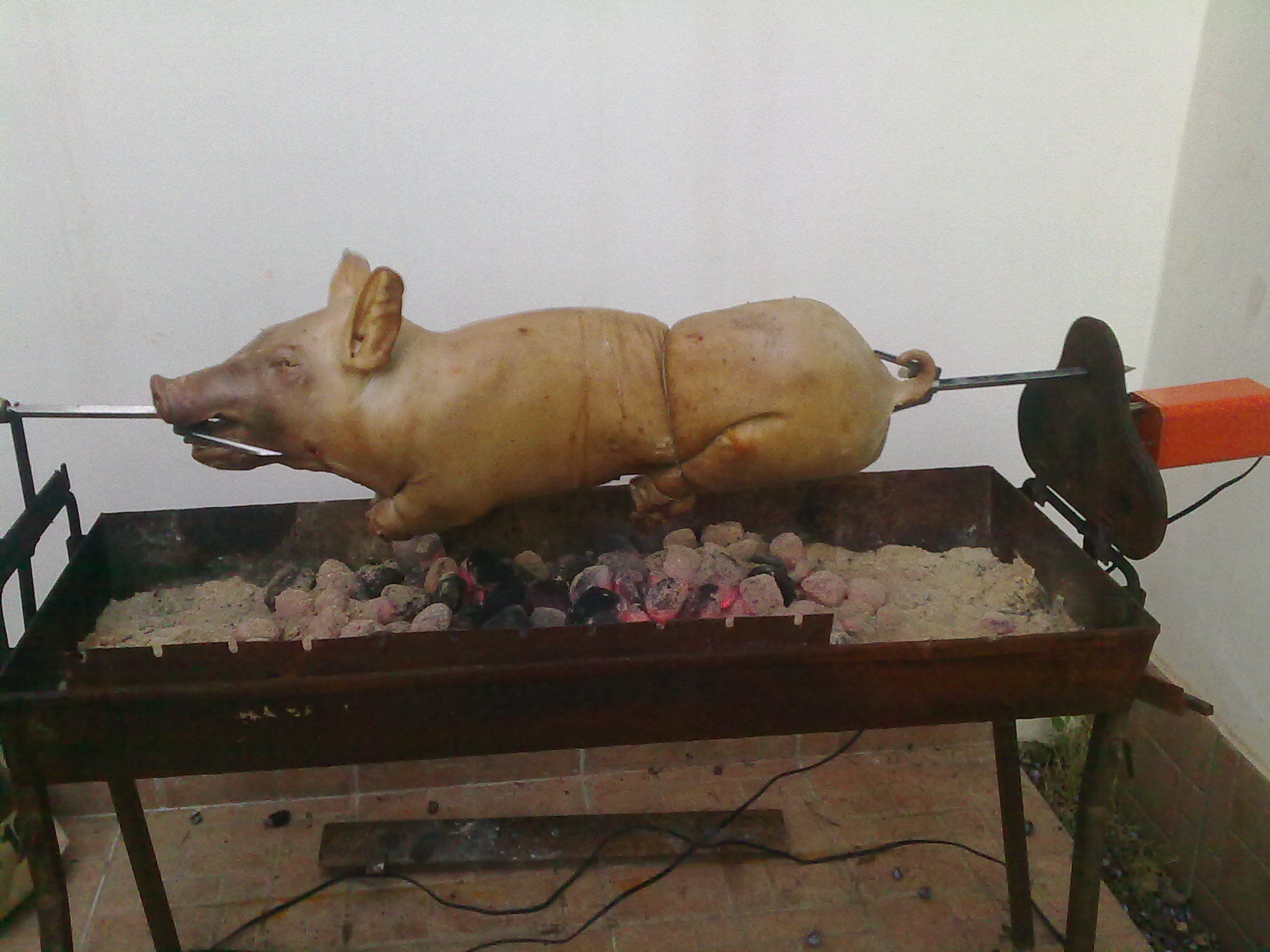
Cooking and eating a whole suckling pig has been a dream of mine for a few years now.  Not just me – it was a dream that I shared with a very good friend of mine.   Yesterday it finally came true. My friend decided that we’ve waited enough and that we should finally do it.  So he got the pig and invited me over (as well as a few other people).

We soon discovered that cooking this thing was not as easy as we imagined.  For one, it seemed that the pig was too heavy for the motor to rotate it.  A new motor, more powerful, was bought.  But it still it didn’t work.  Luckily, almost everyone at a party was an engineer in one sense or another.  So we figured out that the pig had to be re-adjusted, for better balance.  It took us a couple of tries and a few meters of metal wire, but we managed to set it perfectly.  Too bad it was still too heavy for the motor and it simply died.  Gladly, we had more motors that finished the job.

One other thing we had to re-adjust was timing.  Somehow we thought it would be somewhere around two hours to cook it.  But finally it took more than four.  I know there is some formula to calculate the time based on weight of th meat, but nobody seemed to knew it.  Not to worry though – we had plenty of beer and things to talk about.

When the pig was finally cooked, put on table, and tried, I realized that all the wait was definitely worth it.  It was one of the best dishes I ate ever.  And it was the best pork ever.  So soft and so tender, it was unbelievable!

Now that we tried it and realized that it’s even better than we expected it to be, something tells me we’ll do it again.  With more preparations and better understanding of the process.  And even though I’m still digesting it, I can’t wait for that next time.  And if you never tried a suckling pig, I can’t recommend it enough. It’s one of those things everyone just have to try.  Yes, it was really that good.

Smile with “Рождеством Христовым”

A couple of days ago DailyPost suggest the following topic for a blog post: Share something that makes you smile.  I wanted to share something, but so many things make me smile that it’s hard to choose.  Today though I came across something that made me smile, and even laugh.  It’ll take me a bit to explain, so please bear with me.  And if you choose not to, here is an entertaining and short explanation of “bear with me” versus “bare with me”.

Anyway, here we go with the facts:

  1. It’s just after the midnight on January 7th.
  2. Russia, as well as some other countries, celebrate Christmas on January 7th, and not on December 25th.  Wikipedia explains why.
  3. “Merry Christmas” in Russian is “С Рождеством Христовым”.

So, what we have right now is a lot of Russian-speaking people sending “С Рождеством Христовым” via any means possible to a lot of other people.  One of those means is Twitter.  One of many Twitter features is Trending Topics (aka TT).  This is an automatically generated list of most common phrases used across Twitter in some recent period of time (like an hour or two).  And as so many other automated features, this one has its side effects.

Firstly, it seems that it doesn’t much care for the language or alphabet.  It grabs any frequently used phrase in any language or any alphabet, puts it in the list of trending topics, and shows it to any user, no matter what his location or preferred language is.

Secondly, it seems that it tries to minimize the phrase by removing very short words.  Like those consisting of only one or two characters.

So what we have by now is “Рождеством Христовым”, and not “С Рождеством Христовым”.  And that phrase is a number one trending topic, shown to all Twitter users everywhere.  Here is a screenshot.

Here starts the fun.  Most people who see this, have no idea what is it all about.  Many of those, who are trying to find out get confused by incorrect spelling and by the fact that Christmas is over already for most of the world.  That I find funny.

But that’s not all.  Since the phrase went up to trending topics,  it got a lot of special attention.  Humor.  Some people started spreading rumors.  For example, that “Рождеством Христовым” is the name of the new Russian nuclear bomb.  Some others started using the phrase in famous quotes.  For example, “I love the smell OF Рождеством Христовым in the morning!” (original quote talks about napalm and is from the movie “Apocalypse Now”).  That I find hilarious.  You can have a look yourself at everything that has been tweeted with this phrase.

And even that is not all.  Twitter has been known for having hard times during activity spikes.  Today is just one of such spikes.  So Twitter is unstable, falling over the edge.  And when it does so, it shows the famous Fail Whale.

This is cute and worth a smile, but there is still more to the story.  The meaning of Fail Whale varies between people.  Mashable once published an interview with the designer of the image.  While I know the background of this image, I can’t help a different association.  The one that Denis Lebel mentioned in the comment to that interview – the story of the Sperm Whale from Hitchhicker’s Guide to the Universe.

It is important to note that suddenly, and against all probability, a Sperm Whale had been called into existence, several miles above the surface of an alien planet and since this is not a naturally tenable position for a whale, this innocent creature had very little time to come to terms with its identity.

Innocent “Merry Christmas” wishes, weird Cyrillic letters shown to the whole world, rumors of nuclear war from Russian, word play with famous quotes, Twitter outages, and flying whales – I find the mix hilarious.  I hope you do too.

P.S.: To all those of you celebrating – Merry Christmas and С Рождеством Христовым.