WordPress Plugin : WP Instagram Digest

For a while now I enjoyed automated Instagram Digest posts in Yana’s blog.  I’ve decided I want the same for my blog too.  A quick Google search suggests that these are done with WP Instagram Digest plugin.  So I’ve downloaded and installed it.

The configuration is not too complicated.  You’ll need to login into your Instagram account and then go to the developer’s center to register the application and receive the API key and secret token.  Hopefully, eventually this will be a part of automatic configuration, but not yet.  Once you do that, you get can configure the plugin to run at certain times and post to specific category and/or with specific tags.  The cool thing is that you can control the minimum number of new images needed to create a gallery posting.  This feature will prevent empty posts or posts with a single image.


I had to consider if these kinds of posts would be too annoying.  Firstly, I already have an Instagram widget.  That looks nice, but it doesn’t really send out any notifications.  Secondly, when I publish to Instagram I often cross-post the image to Twitter, Facebook, Flickr, and sometimes Foursquare.  I don’t really want to annoy the people with both the individual photos and the digests.  Thirdly, my blog posts are broadcast to Twitter and Facebook, and sometimes Google+.  So, would it be too annoying?  I guess not.  Because since I’ve switched the Social 2.5 plugin, my blog posts aren’t broadcast to Twitter and Facebook automatically – I push them through with a click of a mouse.  So, I guess, I just won’t be pushing the digest posts through and all should be fine.

The first Instagram digest will be out today at 21:00 (server time).  Let’s see how it shows up.  Hopefully it will also work well with the Lightbox plugin for the image popups.  Curious…

P.S.: I’ve also introduced a separate category (Photography->Instagram) for these digests and a new tag – “automated” – that I will try to use for any kind of automated postings.
One of the most dangerous jobs is President of the…

One of the most dangerous jobs is President of the USA. About 10% have died due to job-related issues. And it does not appear that the job has become much safer over the years.

Slashdot comment

WordPress + P2 = Company Intranet in 5 minutes

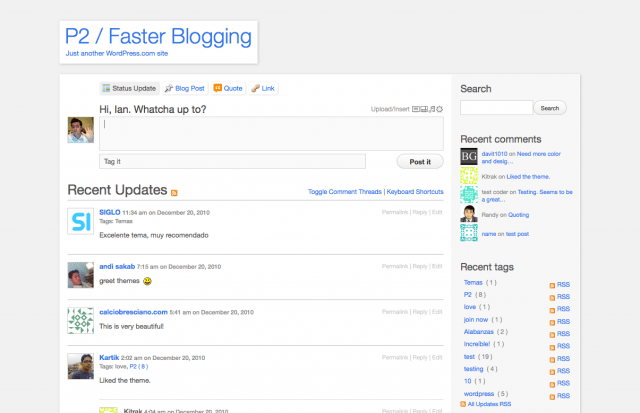
I’ve mentioned a few times already that I became a big fan of P2 theme for WordPress.  I currently maintain multiple installations of it, just because it is so easy to setup and start using.  I have it as company Intranet or as a project collaboration tool.  It’s like a blog, a wiki, and a chat room combined together.  And since I’ve installed it so many times, I thought I should publish what exactly I am doing, in case someone else will want to try it.

Continue reading WordPress + P2 = Company Intranet in 5 minutes

Proper email client

I had a brief discussion with a colleague at work today about email clients.  Once again I had to say that I do miss Mutt.  Gmail is pretty good, but it still lacking a lot of Mutt’s functionality.  And that thing that Outlook and Web Outlook thing that they force us to use at work, is horrible, no matter what you compare it to.

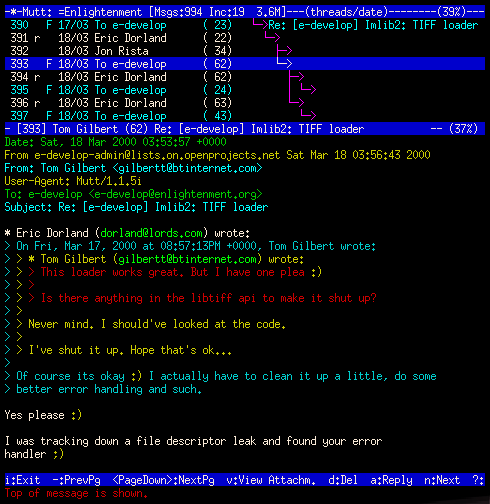
As I was going through the things that I love in Mutt, I mentioned the threaded discussions and quoting.  It was a bit difficult to describe the details, so I quickly searched for a screenshot.  Here’s one.

Unlike grouped replies in MS Outlook and Gmail conversations, here you can clearly see which email is a reply to which email.  Once you get into group discussions, with multiple participants dragging the conversation into different directions, this kind of discussion view becomes extremely useful.

And one other thing is about quoting.  Gmail at least tries to be useful.  MS Outlook is completely horrible in this department.  It quotes full messages UNDER the replies.  So if someone forwarded you an email with quotes from a long discussion, you’ll spend a day reading it.  You’ll need to scroll to the bottom of the message, then scroll up a bit to read the first message in the discussion.  Then scroll up to the second message, and scroll down while reading it.  Then scroll up again to the third message, and scroll down while reading it, and so forth.  I get dizzy just by thinking of that.

Mutt users are from a different culture though.  (Truth be told, not only Mutt users – this culture comes from many years ago, from the times when bandwidth was expensive, rules were strict, and people respected each other’s time.)  In the image above you can clearly see the part of the original email to which the reply was done, and all the other bits of the conversation necessary to understand the current state of discussion.  In fact, the message above includes relevant details from four messages (!!!).  And one look at it is enough to tell who wrote what and when.

Just that screenshot alone makes me want to go back.  And, in fact, given how things have changes since my last thoughts on that, maybe I will.  I won’t get rid of Gmail, since it is mighty convenient to have access from everywhere and good integration with even my mobile phone.  I also can’t imagine the life without Gmail’s SPAM filter.  But, maybe I can find some middle ground and configure Mutt on my hosting server to access Gmail via IMAP.  I’ve done it before, I think it might be time to do it again.